Savings and category targets
There are two ways to save towards something in Jointwise: a savings pot, for money you're putting aside, and a target on a budget category, for costs you spend from later, like Christmas.
Updated 13 November 2026
Savings pots
Joint pots are paid into from the shared budget, as a "pay us first" line split the same way as your bills. Personal pots come out of your own budget.
You can start from the budget instead: open a category (or add one) and turn on "Savings". It moves under "Pay us first" and fills a joint pot: pick one beside the switch, or leave it to make a new one with the same name. A new category called something like "Savings" starts with it on.
- Go to Budget → Savings. Under Joint pots or My pots, choose "+ New joint pot" or "+ New personal pot".
- Give it a name and an icon, and optionally a target and a date. Tap the date box to pick a day from the calendar.
- With a target and a date, Jointwise shows roughly what to put in each month to get there. Tap "Use this" to fill it in.
- Optionally add the account's interest rate, so the save-or-pay-off guide can compare it with your debts. Then "Create pot".
Tap to see it full size
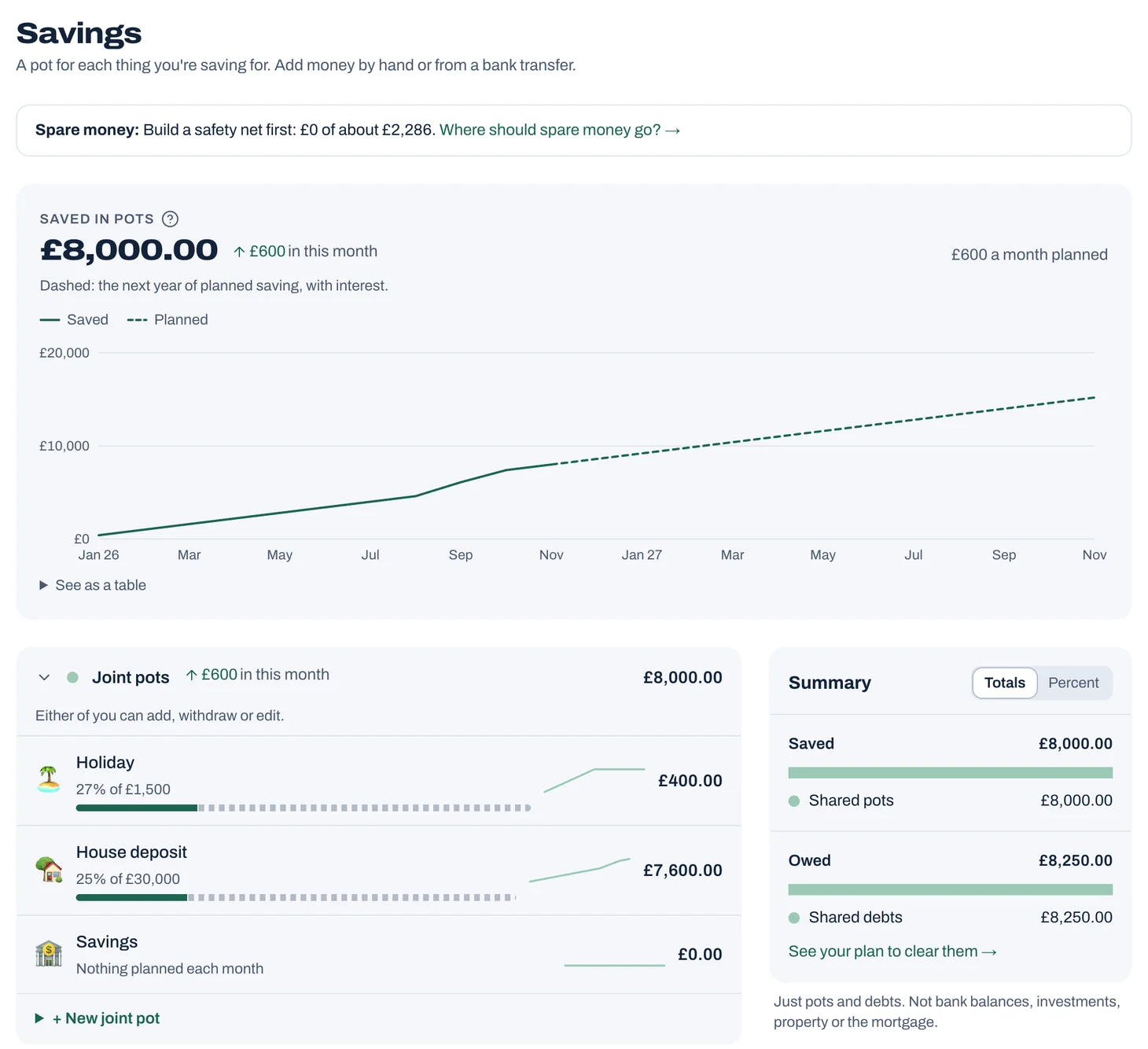
Reading the Savings page
- Saved in pots: everything in the pots you can see, this month's change, and a chart. The dashed line is a year of your planned saving, plus interest where you've added a rate.
- Groups for joint pots, your pots, and your partner's if they share them. Each shows its change this month and its total, and folds away.
- Each pot is a row with a small chart of recent months. Tap it for its progress chart, to add or withdraw money, or to edit or close it.
- Summary, at the side: what's saved and what's owed, split into shared and each of yours. Switch between Totals and Percent.
Tip: Pots and debts are only what you've added in Jointwise. Bank balances and investments aren't included. For your savings and your home less what you owe, see Budget → Reports → Net worth.
What if you skipped something?
Open a pot that has a target and choose something under "What if you skipped", like Takeaways. Jointwise shows when the pot would reach its target with that money going in instead, and how many months sooner that is. Choose "half of it" to cut back rather than stop.
A joint pot offers your shared everyday spending; your own pot offers your own budget's lines. Bills aren't offered, yours or shared. It only shows the answer: to do it, lower that category and raise the pot's amount on the Budget page.
Targets on budget categories
Tap a category on the Budget page to open it, then:
- Save up by a date: turn it on and enter, for example, £600 for Christmas by December. Leftover money rolls on, and Jointwise works out what this month needs to get there in time, counting anything already set aside. Once the date has passed, remove the target or set a new one.
- Refill up to an amount: under "Next month I want to", choose it. "Put in" is what goes in each month. "Keep up to" is the most it holds. Unspent money stays, and it's topped back up whenever you spend from it. For example, vet bills: put in £50 a month and keep up to £200. After four months it's full, so it asks for nothing more. Spend £120 at the vet and it refills over about three months. While it's short of £200, it shows as needing more.
Tip: Yearly bills, and custom ones every few months or years, save up by their due date by themselves, so they don't need a target.
Seeing how you're doing
On the Budget page, the month at a glance says how many targets need more this month, and what each needs. Home's Savings card shows how far your pots are towards their targets.
Not financial advice. Jointwise gives you tools and general information to manage money together. It isn't regulated financial advice. It doesn't know your full circumstances. For free, impartial help, visit MoneyHelper. If debts feel unmanageable, StepChange offers free debt advice. For personal recommendations, speak to a regulated financial adviser.
Related features
More help
Your free trial and subscription
How the 30-day free trial works, founder's pricing, subscribing, switching or cancelling, promo codes, referrals, and how one subscription covers you both.Read your reports
Budget → Reports: Trends, Cash flow and Spending, plus Fair share (who puts in what, next to what you earn), Your year, a look back you can save as a picture, and Tags.Debts and payoff plans
Add debts to Jointwise, compare avalanche and snowball payoff plans, see your debt-free date, and track progress.Reminders and notifications
Reminders for bills, plans, to-dos, date nights, your weekly review and monthly check-in, by phone notification or one morning email.
Sort your money together tonight.
Set it up in one evening and invite your partner with a link. Your 30 free days start when they join.
No card to start. Nothing deleted if you stop. Either of you can leave any time.