Debts and payoff plans
Debts brings everything you owe into one place, with a plan to clear it and a date to aim for.
Updated 14 November 2026
The short answer
Go to Budget → Reports → Debts and add each debt with its balance, interest rate and minimum payment. Choose a plan (avalanche pays the highest rate first, snowball the smallest balance first) and an extra amount a month, and Jointwise shows your debt-free date and the interest it saves.
Add your debts
Choose "+ Add a debt" for each one: credit cards, car finance, personal loans, overdrafts, buy now pay later, student loans or a mortgage. Enter the balance, the interest rate and the minimum payment. A debt can be yours, your partner's or joint, and shared or private like the rest of your money.
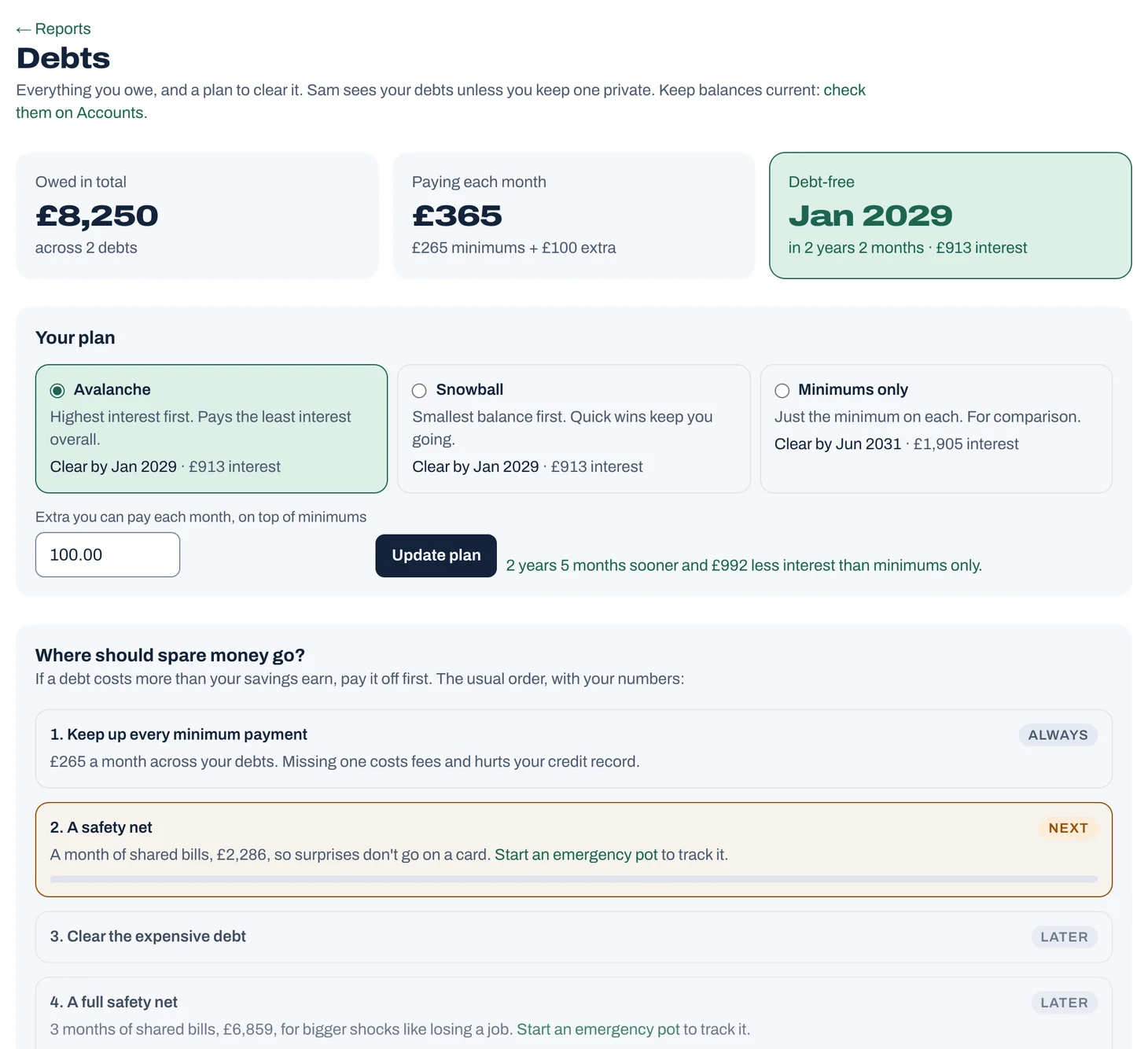
Tap to see it full size
Choose a plan
Set how much extra you can pay each month and choose "Update plan". Jointwise shows the order, your debt-free date and the interest each plan saves. Student loans are put last: see the guide to saving or paying off debt for why.
- Avalanche: extra money goes to the highest interest rate first. Usually the least interest overall.
- Snowball: extra money goes to the smallest balance first. Quick wins can help you keep going.
- Minimums only: for comparison.
Record payments
Choose "Record payment" to bring a balance down. A payment bigger than what's owed counts only what cleared it. Changing a loan's balance under "Edit" counts the same way: what it's come down by is paid off. The Progress chart shows how far you've come.
Credit cards are different: their balance follows what's spent on them and the payments marked on your bank statement, so there's no "Record payment" for them, and you edit them on Cards. A card you clear in full every month isn't borrowing, so it stays out of the plan. See "Credit cards in your budget".
Your mortgage and your home
Add your mortgage with "+ Add a debt" and choose Mortgage. It gets its own section, apart from your other debts: it isn't in the plan, the total owed or your debt-free date, and it shows when it clears on its own monthly payment. Then add what your home is worth on Reports → Net worth to see your equity, how much of the home is yours, and how it grows as you pay the mortgage down.
Not financial advice. Jointwise gives you tools and general information to manage money together. It isn't regulated financial advice. It doesn't know your full circumstances. For free, impartial help, visit MoneyHelper. If debts feel unmanageable, StepChange offers free debt advice. For personal recommendations, speak to a regulated financial adviser.
Related features
More help
Savings and category targets
Set up savings pots with a target and date, and Jointwise works out what to put in each month. Add targets to budget categories too.Your free trial and subscription
How the 30-day free trial works, founder's pricing, subscribing, switching or cancelling, promo codes, referrals, and how one subscription covers you both.Read your reports
Budget → Reports: Trends, Cash flow and Spending, plus Fair share (who puts in what, next to what you earn), Your year, a look back you can save as a picture, and Tags.Credit cards in your budget
Track spending on a credit card, joint or your own: it counts in your budget when you buy, and paying the card off isn't counted twice.
Sort your money together tonight.
Set it up in one evening and invite your partner with a link. Your 30 free days start when they join.
No card to start. Nothing deleted if you stop. Either of you can leave any time.