Getting started with Jointwise
You answer three short screens, then you're in the app, and the rest of your budget is built from Home whenever suits you both.
Updated 12 November 2026
Create your account
Sign up with your email address or a Google account. Each of you has your own sign-in, so you each see your own private budget alongside everything you share. Start on your own: you can invite your partner once you're in.
Want to look around first? Choose the sample household. It's full of example data for a couple called Alex and Sam, and you can leave it for a real household whenever you like.
The three setup screens
Setup is one panel with a picture on the left (across the top on a phone) and "Step 1 of 3" above each step, with a bar along the top showing how far you've got.
- Setting up together: what's ahead, and how you'd like to start: from scratch, from your bank statement, or from a budget you already keep in a spreadsheet. Choose the statement or the spreadsheet and, once the first screens are done, you go straight to bringing it in. For a statement, download the last 90 days from your banking app if you can: Jointwise spots your regular bills and usual spending from it. A spreadsheet you can paste, upload, or link from Google Sheets.
- About you two: your currency, what you're working towards, and whether you have children, pets or a car. Each answer does something on the next screens: a goal becomes a savings pot, and children, pets and a car add their usual bills to the list, already ticked.
- How you bank and share: all together (everything you both earn goes into your joint account), yours, mine and ours (a joint account for shared things, and some money of your own), or mostly separate. Then, unless you pool everything, how you'd like to split shared bills: by income, 50/50, your own agreed share, or each paying certain bills. If you have a joint account, it also asks what your banking app shows for it right now. That's your first bank check, so what you each pay in counts money that's already there; leave it blank and do it later from the joint account. Pay isn't asked for here: each of you adds your own take-home pay from Home, and until both are in, a split by income is 50/50.
Tip: Take-home pay is on Home's getting-started list as "Add your take-home pay", for each of you to add your own. Only know your salary? Under your pay in Budget settings, "Only know your salary? Work it out" estimates it after tax, National Insurance, pension and student loan (UK only). If it changes month to month, enter what you'd get in a quiet month, and in Budget → Budget settings tick "Pay varies month to month": Jointwise plans around it and helps you build a buffer.
Your getting-started list
Once you're in, Home shows a getting-started list, one stage at a time. First, your first win: your pay, your shared bills, inviting your partner and agreeing the budget together, so you both see what each of you pays in. Then, making it a habit: adding this week's spending, the Sunday review reminder, a check-in date and your first monthly check-in. Last, when you're ready: savings pots, money agreements, Jointwise on your phone, reminders, a date night idea, a chore, a calendar plan and things to do near you.
Each item drops off the list as you do it, and the bar at the top keeps count. The list disappears when everything's done. Inviting your partner drops off as soon as you send the link. You can hide the list at any time.
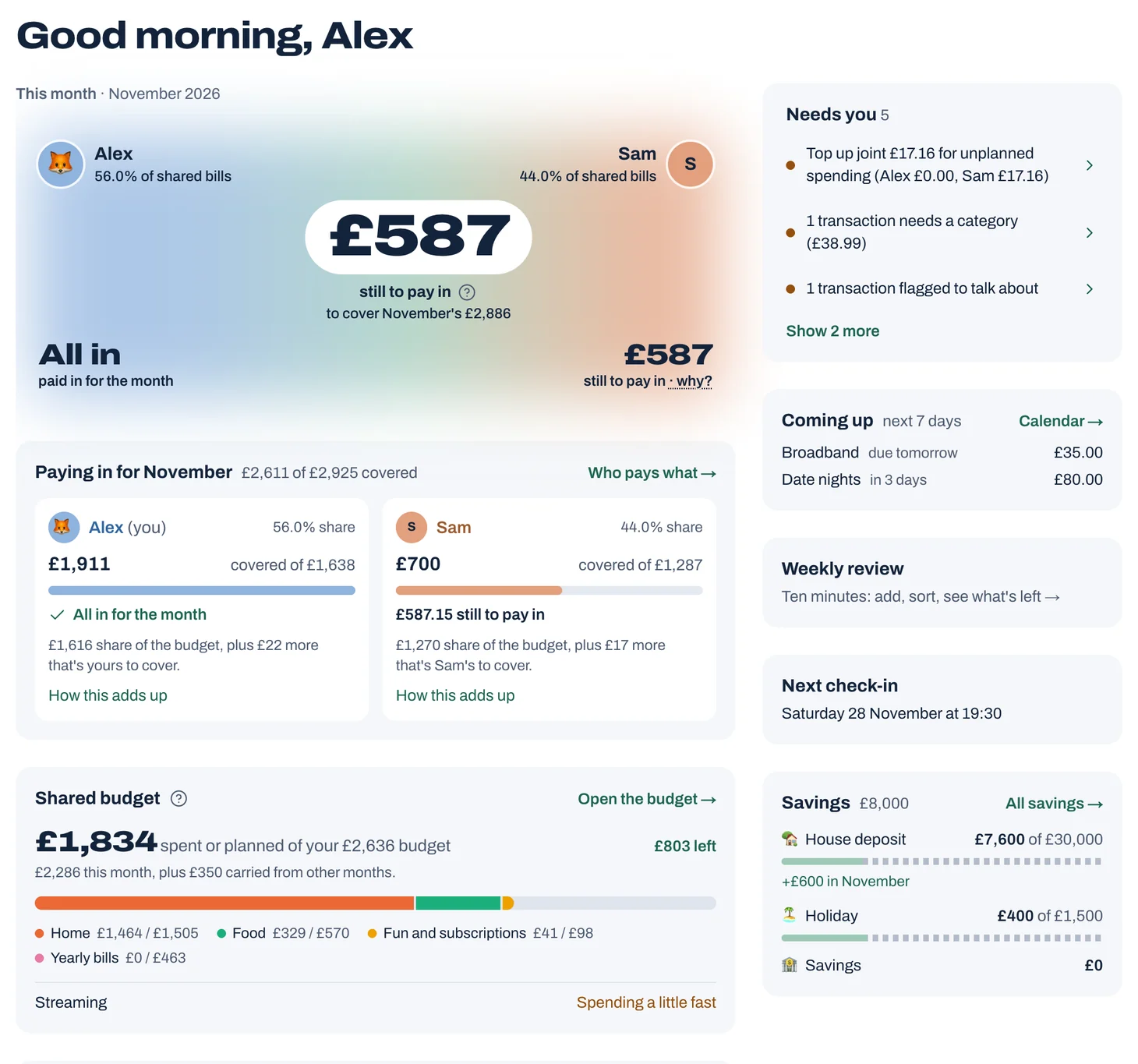
Tap to see it full size
Your first month, without the homework
The hardest part of starting is months of old spending that all seems to need sorting. You don't have to. When you agree on your budget, you choose when it starts: the 1st of next month is the easiest. Anything before then is history. It still shows in your lists and reports, but it never needs a category, and Home shows those months as history with nothing to pay in.
When you add your bills, you can import a bank statement from the last 2 or 3 months. Jointwise spots your regular payments and what you usually spend on things like food shopping, and you tick them into your budget. It's kept as history, so there's nothing to sort.
From your start date on, only new spending needs a category, a few a day. Catch up, under Spending → Transactions → "Needs your attention", takes you through them one at a time.
Tip: Change the start date any time in Budget → Budget settings.
The tour
The first time you open Home, a short tour points out each part of the app with a speech bubble. Skip it if you like; you can take it again from Settings.
Where things are
- Home: this month's shared budget at a glance, what needs you, and your getting-started list.
- Spending: transactions (with importing a statement and the bank check), settling up and spending requests.
- Budget: your shared budget, your own budget, savings pots, and reports (with debts and What if…?).
- Calendar: the shared calendar and to-dos.
- Things to do: What's On and date nights.
- Together: messages (with anything waiting for your OK) and your monthly check-in.
Tip: On a computer, the area you're in (Spending, Budget and so on) opens up in the sidebar to show its pages, and settings, help and the Community (questions, tips and wins from other couples) are at the bottom of the sidebar. On a phone, an area's pages are tabs along the top, the six areas are in the bar along the bottom (Things to do is called Outings there), and settings, help and the Community are behind the gear button at the top. What's new, the ideas board and feedback are in Settings.
Not financial advice. Jointwise gives you tools and general information to manage money together. It isn't regulated financial advice. It doesn't know your full circumstances.
Related features
More help
What Home shows you
Home leads with your shared budget: whether the month is covered and where each of you is with paying in. Then what needs you, today and what's coming up.Invite your partner
How to invite your partner to your Jointwise household with a one-time link, and what they see when they join.If you pool everything: All together
Everything you both earn goes into your joint account? Choose All together and Jointwise drops the split, who pays and settling up. Switch any time.If you each pay certain bills
No split: one of you pays the rent, the other the energy and broadband. Give each bill to one of you and Jointwise adds up what you each pay.
Sort your money together tonight.
Set it up in one evening and invite your partner with a link. Your 30 free days start when they join.
No card to start. Nothing deleted if you stop. Either of you can leave any time.