Find things to do with What's On
What's On shows gigs, comedy, theatre and more near you, and puts the cost in your budget in the month you buy the tickets.
Updated 7 November 2026
The short answer
Go to Things to do → What's On and pick a town and how far you'll go. Tap Fancy it on anything you'd like to do; when you both do, it shows under You both fancy. Press Add to budget to put it in the calendar and take the cost from a budget line this month, or spread it over a few months.
Choose where you go out
- Go to Things to do → What's On.
- Type a town, an area or the first part of a postcode, and pick it from the list.
- Choose how far you'll go: 5, 10, 20 or 30 miles.
- Add up to three places, like home and the nearest city, with "+ Add a place".
Tip: Listings come from Skiddle, Ticketmaster and See Tickets and are updated each morning. If you've just added a place, give it a minute and refresh.
Browse and fancy
Boxes at the top choose what you see. Show: everything, what either of you has fancied, or what you both fancy. When (while Show is on everything): this weekend, the next two weeks or the next six. Kind: gigs, comedy, theatre and arts, club nights, family, sport, or something different. Price each: any price, or up to £10, £20, £30 or £50 for the cheapest ticket (listings that don't give a price are left out). Below them, the Fits filter, named after your usual line (like "Fits Date nights"), shows only what two tickets would leave room for on it this month.
Tap Fancy it on anything you'd like to do. In Show, Fancied is what either of you has picked, and You both fancy is the ones you both picked. The choice with your partner's name is what they've fancied that you haven't yet; when there's any, a link under the boxes says how many.
Choose Day, Week or Month to group the list. Or press Swipe to go through them one at a time: swipe right (or tap the thumb) to fancy it, left to skip. If your partner already fancies it, you'll know straight away, and can add it to the budget there and then.
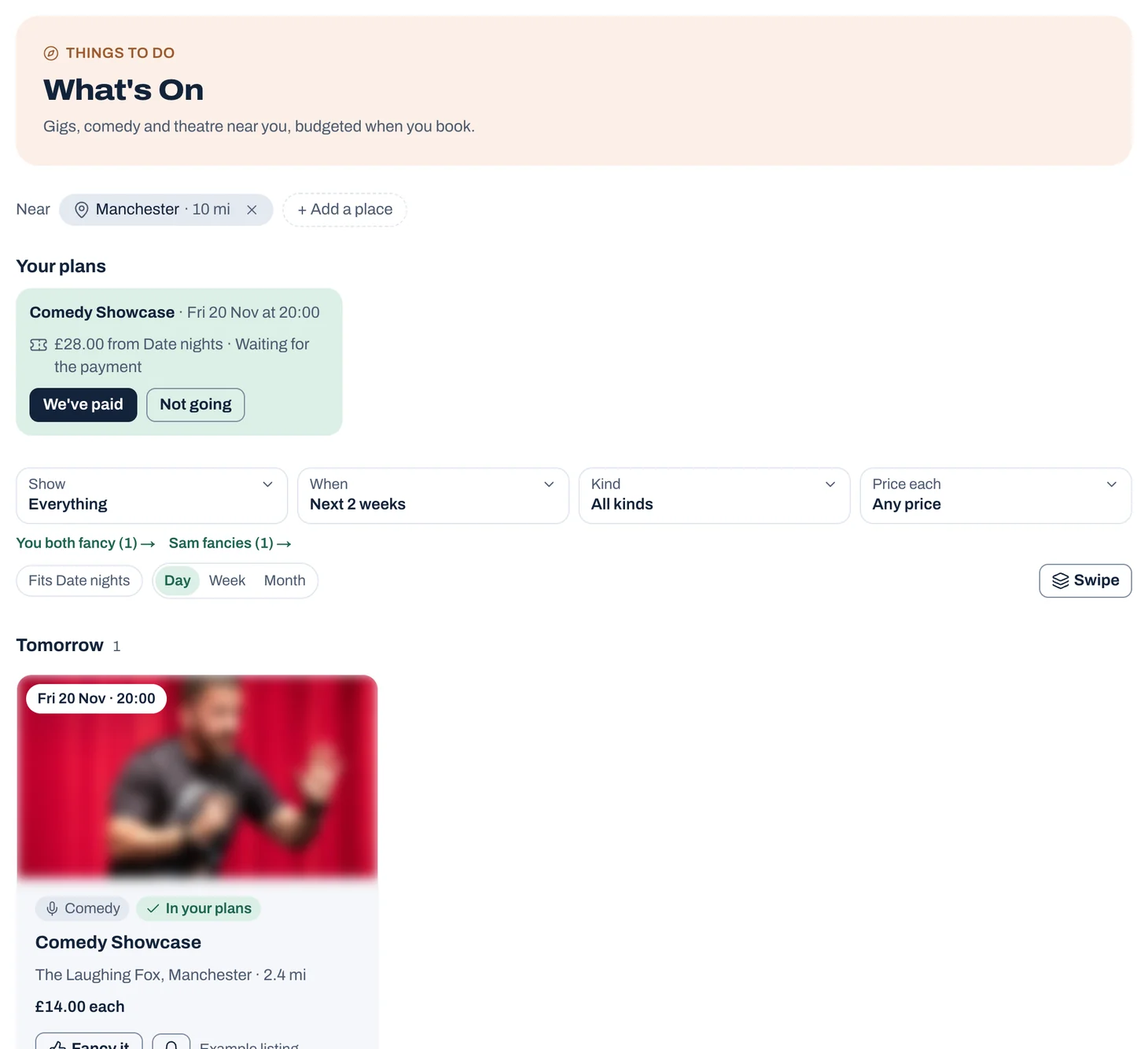
Tap to see it full size
Add it to the budget
- Press Add to budget on a listing.
- Say who's going and how many tickets, and add a rough figure for extras like food or travel if you like.
- Choose where it comes from: a shared line, like Date nights, or your own money. Type in the box to find a line. If there isn't one, choose "+ Add" with the name you typed to start it.
- From a shared line, choose how to split it: as that line usually is, 50 / 50, by income, one of you pays all of it, or another split you type in. When the payment comes in and is matched to the plan, settling up uses that split.
- It goes in the shared calendar, and shows as planned on that line straight away.
Make it a surprise
In Add to budget, tick "Make it a surprise" for your partner. They see "keep the evening free" on the calendar on its date and time, and nothing else: not what it is, where, or what it costs, and it's left out of their reminders, emails, search and What's On. It's paid from your own money, so it isn't in the shared budget either.
It's revealed the day after. To tell them sooner, press Reveal now on the plan, and they get a notification. You can make any plan on the calendar a surprise the same way.
Picked for you, alerts and the Thursday round-up
Picked for you, at the top, is a handful of things on near you that you'd both enjoy, with why. They're chosen each morning from what you've fancied and booked before, so the more you fancy, the better they get. Only the listings and your likes are used, nothing from your budget.
Tap the bell on a listing to follow its act or its venue. When a new date turns up near you, you get an alert. Following shows everything on from what you follow over the next six months, and you can add or remove follows there. Alerts are just for you.
On Thursday mornings the round-up tells each of you what's on that weekend and the week after that you both fancy, from what you follow, and your picks. Turn it on or off, and add it to your morning email, in Settings → Notifications and reminders.
If it's more than you have left
- Go over this month, and sort it out yourselves.
- Go over, and take it off next month's line. This turns on rollover for the line, so what's over carries into next month.
- Spread it over 2, 3, 4 or 6 months. Jointwise shows what that takes each month.
Buying the tickets
Buy on the ticket site using the link on the listing. When the payment comes in from your bank statement, Jointwise matches it to the plan, or press We've paid. Prices on listings are per ticket and may not include booking fees.
Common questions
Does What's On cost anything?
It's part of your Jointwise subscription, including Picked for you, alerts and the round-up. It's in the 30-day free trial too.
Will my partner find out about a surprise?
Not from Jointwise. They see only that the evening is taken, until the day after or until you reveal it. If you share your own budget with them, keep the spending a surprise too, from Spending.
Where does it work?
What's On covers the UK for now.
Why does the cost come out of this month and not the month of the event?
Because that's when you buy the tickets and the money leaves your account. You can spread a big one over a few months if you'd rather.
Not financial advice. Jointwise gives you tools and general information to manage money together. It isn't regulated financial advice. It doesn't know your full circumstances.
Related features
More help
Plan date nights that fit your budget
Use Jointwise's date nights: pick ideas that fit what's left this month, plan them on the calendar, and save up for bigger ones.Use the shared calendar
Plans and bills side by side: reminders, comments, week and list views, repeats, your other calendars, bank holidays and when you're both free.Share chores with to-dos
Add chores and one-off jobs in Jointwise, give them to one of you or both, set them to repeat, and see what's due.Settling up between you
How Jointwise tracks money between the two of you, shared spending from your own accounts, paying joint back, and how to settle up or call it even.
Sort your money together tonight.
Set it up in one evening and invite your partner with a link. Your 30 free days start when they join.
No card to start. Nothing deleted if you stop. Either of you can leave any time.